EU Repairability Label Basics
The EU repairability label is a standardized way to show how easy a smartphone is to repair, based on measurable criteria rather than brand promises. It targets the parts that most often fail or wear out, such as the battery and the display, and it also considers whether key components can be replaced without destroying other parts. The label appears in product marketing for eligible devices in the EU, using a score that consumers can compare across models.
In practice, the label focuses on repair actions that a technician or a careful owner could perform with common tools and documented procedures. A phone that earns a higher score typically has fewer barriers to opening the device, fewer soldered connections for replaceable parts, and more accessible internal components. The label does not measure whether a repair shop is nearby, whether a specific part is in stock, or whether your carrier will accept the device for warranty work.
For example, a model with a battery that can be removed without cutting the frame usually scores better than one where the battery is strongly bonded and requires extensive disassembly. A screen that can be replaced without replacing the entire front assembly also tends to score higher, though the exact scoring depends on the test method used for that device category.
What People Misread
Many shoppers treat the label as a guarantee that their phone will be cheap to fix. The label measures repairability of the design, not the price of parts, labor rates, or shipping costs. A highly repairable design can still be expensive if the manufacturer prices parts aggressively or if the repair network is limited.
Another common misunderstanding is assuming the label predicts how long repairs will take. Repair turnaround depends on parts availability, the repair shop’s workflow, and whether the device needs software steps after replacement. Some repairs require calibration or pairing steps, and those steps can vary by model and region.
People also overestimate what the label can tell them about software support. The EU label includes criteria related to documentation and the availability of spare parts, but it does not replace separate rules on software updates. For software, you still need to check the manufacturer’s stated update policy and the device’s release date, because the label score alone cannot confirm update duration.
Under the hood, the label relies on a structured assessment of the device’s physical design and repair process. The assessment looks at factors such as tool requirements, the ease of removing covers, the accessibility of components, and the presence of adhesives or fasteners that complicate replacement. It also considers whether the manufacturer provides repair-relevant information, which depends on documentation quality and how consistently it matches the actual repair steps.
One practical aside: in a product listing, the label score may appear without the underlying breakdown. If you want to know whether the battery or the display drives the score, you may need to look for the label’s detailed report or the manufacturer’s repair documentation, which can be harder to find than the marketing score itself.
How The Score Is Built
The label uses a scoring system that translates repairability criteria into a numeric result. The criteria typically cover the battery, display, and other components that are commonly repaired, plus the overall repair process. The scoring approach aims to be comparable across models by using a consistent method for evaluating disassembly and replacement steps.
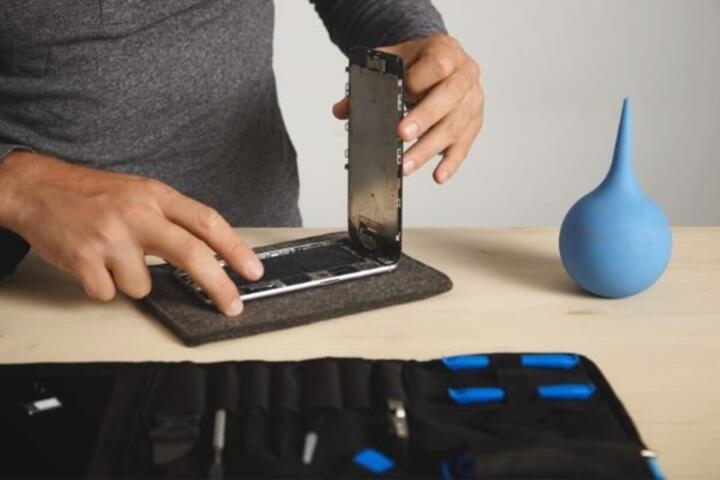
Battery repairability often hinges on whether the battery is accessible after removing the back cover and whether it can be detached without damaging the enclosure. Display repairability often depends on whether the display is modular or integrated with other assemblies, and whether removing it requires extensive removal of unrelated components.
Some models score lower because they use adhesives that require heat or specialized procedures, or because they integrate components in a way that forces replacement of larger assemblies. Others score higher because they use screws and modular connectors that reduce the risk of collateral damage during repair. The label does not grade the durability of the phone in daily use; it grades the design’s repair path.
Documentation criteria matter too. If repair information is incomplete or not aligned with the device’s actual internal layout, a technician may spend extra time figuring out steps that the label assumes are clear. That gap can affect real-world repair outcomes even when the physical design looks repair-friendly on paper.
On a personal note from reading label disclosures, the same score can hide different trade-offs: one phone may be easy to open but harder to reassemble cleanly, while another may have a modular display but a battery that is more time-consuming to remove.
Solutions And Advice
Check The Label Breakdown
Start by locating the label score and any available sub-scores for battery and display. When the listing shows only a single number, search for the device’s repairability report or the manufacturer’s repair information page. Compare models using the same scoring source, because label presentation can vary by retailer.
Practical target: if you expect to replace a battery within a few years, prioritize models that score well on battery repairability rather than only on overall score. If you expect screen damage risk, prioritize display repairability. A phone that scores well overall but scores poorly on the part you are most likely to replace can still cost more over time.
Plan For Parts And Tools
Repairability on paper does not guarantee parts availability. Before buying, check whether spare parts are sold through official channels or authorized repair partners in your country. If you repair yourself, confirm that the needed tools are realistic for your setup; some repairs require heat control, torque-limited drivers, or careful adhesive removal.
A mild frustration point: many “repair-friendly” phones still require patience during reassembly, and adhesives can be the part that slows you down. If you do DIY repairs, budget time for cleaning old adhesive residue and for resealing, because a rushed seal can lead to dust or water ingress issues.
Verify Documentation Access
Look for whether the manufacturer provides repair instructions and whether they are accessible without excessive friction. The EU label assessment includes documentation-related criteria, but the quality of that documentation can vary in how usable it is for real repairs.
When you review documentation, check whether it includes step-by-step disassembly, safe handling notes for cables and connectors, and guidance on reassembly. If the instructions reference software steps, confirm whether those steps require manufacturer tools or account access, because that can shift the repair from DIY to a service center.
Small aside: I’ve seen repair guides that list parts diagrams but omit the exact order for disconnecting flex cables, which matters when connectors sit under shielding. A label score cannot fix missing details in the guide you actually use.
Account For Warranty And Data
Before opening the device, check warranty terms and whether third-party repairs affect coverage. Also plan for data handling: repairs can involve power cycling, and some service processes require device reset or re-pairing of components.
Realistic outcome expectation: even with a repairable design, you may need to back up data and verify that you can sign back into accounts after the repair. If the repair shop uses manufacturer tools, ask whether the process includes any device configuration steps and how long the device will be out of service.
Case Examples
Scenario 1 (Battery replacement): A buyer compares two phones released in the same year. Phone A shows a higher repairability score driven by battery accessibility, while Phone B scores slightly lower overall but has a modular display. The buyer expects battery wear first and chooses Phone A, then confirms that the local authorized repair partner lists battery availability. The repair takes longer than the buyer expects because the shop orders parts and schedules work for the following week, even though the device design supports battery replacement.
Scenario 2 (Screen damage): A renter breaks the screen and wants a fast repair without replacing the entire front assembly. The label indicates better display repairability for one model, but the renter discovers that the repair shop offers only a bundled replacement for that specific device variant. The renter chooses the model with the better label score, yet the final cost depends on the shop’s parts policy and whether the shop can source the exact display module quickly.
Repairability Checklist
| Decision Point | What The EU Label Helps With | What It Does Not Cover | What To Check Next |
|---|---|---|---|
| Battery repair | How accessible the battery is and how hard it is to remove | Battery price, local parts stock, repair appointment timing | Ask the repair partner about battery part availability and lead times |
| Screen repair | Whether the display is modular and how disassembly is structured | Whether the shop replaces the exact module versus a bundled assembly | Confirm the shop’s parts policy for your exact model number |
| Repair documentation | Whether repair info is part of the assessed criteria | Whether the documentation matches your region’s parts and service tools | Review the published guide and look for region-specific notes |
| Software after repair | Some repairability criteria may reference post-repair steps | Update policy duration and security patch timelines | Check the manufacturer’s update commitment for that model and release date |
- Write down your most likely repair: battery, screen, charging port, or camera module.
- Compare label scores with sub-scores if available, then match them to your likely repair.
- Check whether the repair partner in your country lists the needed spare parts for that exact model.
- Ask whether the repair requires software steps and whether the shop handles them.
- Plan for data backup and warranty implications before opening the device.
Common Mistakes
One mistake is treating the label as a proxy for durability. Repairability describes how a device can be fixed, not how often it fails. A phone can be repairable and still have a high failure rate due to component stress in real use.
Another mistake is comparing scores across different device categories or using retailer screenshots that omit the label’s context. If the label is missing, altered, or shown without the device identifier, the comparison becomes unreliable.
People also underestimate the role of adhesives and sealing. Even when a device scores well for disassembly, resealing for water and dust protection can be the step that determines whether the phone remains safe to use after repair. If you repair yourself, follow the documented sealing approach rather than improvising.
Finally, shoppers sometimes ignore the “after repair” steps. Some repairs require calibration, re-pairing, or verification steps that affect touch response, fingerprint readers, or display behavior. If you skip those steps, the phone may work but not as expected, and troubleshooting can become harder.
FAQ
What Does The EU Label Score Measure?
The score reflects design repairability criteria such as how accessible key components are and how feasible it is to replace them using documented repair steps. It does not measure repair cost, local availability, or how quickly a shop can schedule work.
Does A Higher Score Mean Cheaper Repairs?
A higher score usually indicates easier repairs, but price depends on parts cost, labor rates, and whether the shop replaces a module or a bundled assembly. The label helps with the “how hard” part, not the “how much” part.
Can I Use The Label To Predict Battery Lifespan?
The label does not predict battery lifespan. It evaluates how replaceable the battery is, not how quickly it degrades under your usage patterns.
Does The Label Cover Software Update Support?
The label includes some repair-related documentation criteria, but it does not replace software update commitments. For update duration and security patch timelines, you still need the manufacturer’s policy for that specific model.
Where Can I Find The Label Details For A Model?
Retail listings may show the score, but the underlying breakdown can require checking the product’s label documentation or the manufacturer’s repair information pages. If the details are missing, contact the seller or look for the device’s official label materials.
Author's Insight
The EU repairability label is best treated as a design audit, not a repair service guarantee. The most useful way to use it is to match the label’s repairability focus to the part you expect to replace, then verify parts availability and post-repair steps with a repair partner. Documentation quality affects real repair time, and the label cannot fully capture how usable the instructions are for a specific technician workflow. When you compare models, record the exact model identifier and check whether the label details are accessible, because screenshots often omit the context that makes comparisons fair.
Key Takeaways
- The EU label measures repairability of the phone’s design and repair process, not repair prices or turnaround times.
- Use the label to compare likely repairs: battery and display scores matter most if those are your pain points.
- Confirm spare-part availability and whether repairs require software steps through a local repair partner.
- Plan for warranty terms, data backup, and resealing steps after repair, since those factors shape real outcomes.